

The short answer: which built-in tool replaces which addon
WeakAuras, Details! and Bartender4 have no official WoW Forever release as of September 28, 2026.
Forever ships its own tools for part of what those three addons did: Edit Mode for moving and resizing the interface, a damage meter and the Cooldown Manager.
Blizzard confirmed the damage meter and the Cooldown Manager for Forever in its developer Q&A on September 17, 2026, and its beta notes updated September 24 mention Edit Mode layouts.
| Classic Era addon | Forever built-in tool | How far it goes |
|---|---|---|
| WeakAuras | Cooldown Manager | Partly: cooldown and buff icons5 classes testable in the beta, trigger options not announced |
| Details! | Damage meter | Confirmed for ForeverForever feature list not published |
| Bartender4 | Edit Mode | Moves and resizes interface elementslayouts confirmed in the beta notes |
| Threat meter | None announced | Nameplate aggro display unconfirmedsee the threat section |
Status checked on September 28, 2026, against Blizzard posts and each addon's release page.
None of them is a full copy of the addon it replaces, and Blizzard has not announced a built-in threat meter.
Much of what Blizzard has published about how these tools work comes from modern World of Warcraft, whose addon API Forever uses; where Forever may differ, we say so.
This guide is built from Blizzard's official posts and the addons' own release pages, not from our own play sessions.
Why these addons are missing: Forever uses the modern addon API
In the developer Q&A on September 17, 2026, Blizzard was asked whether Forever would use Midnight's addon restrictions, the Classic API or something else.
The answer was that the team chose the modern API approach.
The developer added that boss encounters in Forever are much simpler than in the modern game, so the developer does not expect the combat restrictions to hurt players' experience much.
The reason given is that sharing one API with the modern game should make addons easier to keep updated and to build.
In the same answer Blizzard said it does not want players to feel they need addons to play, named the damage meter and the Cooldown Manager as tools Forever offers, and said a swing timer may come soon.
What the modern rules mean comes from Blizzard's Midnight articles of October and November 2025: addons should not be able to automate combat decisions for the player.
Information about the current combat state becomes a secret value that addons can display but not read to drive their own logic.
Addons can still restyle almost everything you see, including raid frames, nameplates, action bars, panels, fonts and art.
Blizzard has not published a Forever-specific list of which API functions differ from the modern game.
We checked each addon's own release page on September 28, 2026.
| Addon | Latest release | Forever |
|---|---|---|
| WeakAuras | 5.22.0September 5 | Not listed |
| Bartender4 | 4.17.9.1August 12 | Source code onlysince September 27 |
| Details! | CurseForge releaseSeptember 18 | Source code onlysince September 24 |
Checked on September 28, 2026, on each addon's GitHub or CurseForge page.
WeakAuras' latest release is 5.22.0 from September 5, 2026, and it does not list Forever.
Bartender4's latest release is 4.17.9.1 from August 12, 2026; on September 27 its source code added Forever's interface number 16001 and Forever presets, but no release file has followed yet.
Details!' latest CurseForge release, from September 18, 2026, does not list Forever, and its source repository shows Forever work since September 24.
Any Forever release of these addons will have to work within the same combat restrictions.
Edit Mode: set up your layout instead of Bartender4
Edit Mode is the built-in layout editor, and Forever has it: Blizzard's beta notes updated September 24 fixed a bug that stopped Edit Mode layouts from applying while the gamepad UI is enabled.
Blizzard introduced Edit Mode in the modern game in 2022 and described it as a way to move almost anything anywhere, with options for each element and layouts you can name, save, copy and share.
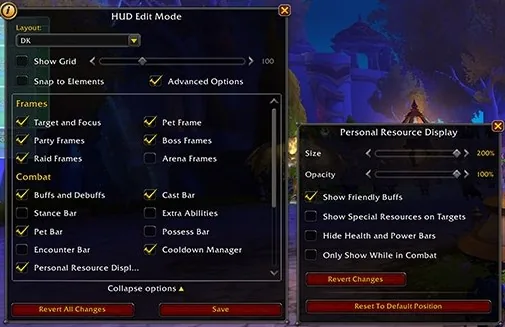
Classic Era players may already know it: in July 2026 Blizzard said patch 1.15.9 would bring Edit Mode to the WoW Classic games.
The steps below are how Blizzard described Edit Mode for the modern game; Blizzard has not published Forever's own menus, so check each step in the beta.
① Press Esc and select Edit Mode, the route Blizzard's community manager gave for the modern game.
② Pick a layout in the layout dropdown, or copy one under a new name so the default stays untouched.
③ Click an element on screen to drag it and open its own options, such as size or visibility.
④ Save the layout before you close Edit Mode.
Edit Mode in the modern game
- Esc → Edit Mode
- Pick or copy a layoutlayout dropdown
- Drag elementseach has its own options
- Savecheck the same menus in the Forever beta
In the modern game, Blizzard also recommended exporting a layout as text (Share, then Copy To Clipboard) after a 2022 bug erased saved layouts, and restoring it with Import.
Blizzard has not confirmed that Share and Import exist in Forever's Edit Mode, so treat them as something to look for in the beta, not as a guaranteed backup.
Blizzard has not published a list of which Forever interface elements Edit Mode can move, so check the bar or frame you used Bartender4 for in the beta.
Blizzard's known-issues list from September 18 says the minimap may be partially off the screen, which is a game issue rather than something wrong with your layout.
The damage meter instead of Details!
Blizzard confirmed in the September 17 Q&A that Forever offers the damage meter.
Blizzard has not published a Forever-specific description, so the details below come from its notes for the modern game's Midnight pre-expansion update in January 2026.
| Modern-game feature | Blizzard's description |
|---|---|
| Switch | Options > Gameplay Enhancements > Damage Meter |
| Categories |
|
| Windows | Up to 3, main window set in Edit Mode |
| History | Each encounter plus up to the last 30 |
| Breakdown | Click an entry for per-spell detail |
From Blizzard's Midnight pre-expansion notes for the modern game; not confirmed feature by feature for Forever.
In the modern game you switch it on under Options > Gameplay Enhancements > Damage Meter.
Its categories are damage done, damage per second (DPS), damage taken, avoidable damage taken, healing done, healing per second (HPS), interrupts and dispels.
It can show up to 3 windows at once; the main window is moved, resized and styled in Edit Mode.
It keeps each encounter plus a summary of up to the last 30 encounters, and clicking an entry opens a per-spell breakdown.
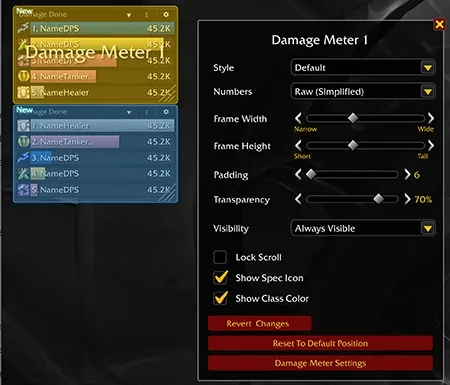
Blizzard says the modern meter is tracked server-side, which can be more accurate in some situations than addons were.
Threat is not one of the modern categories.
Check these points in the Forever beta yourself, because Blizzard has not confirmed that Forever's meter has the same switch, categories or window count.
The Cooldown Manager: a partial WeakAuras replacement
Blizzard describes Forever's Cooldown Manager as a tool that pulls critical information from the buff bar or action bar and places it wherever you choose.
It is off by default; turn it on in Options under the Gameplay Enhancement settings.
Turn on the Cooldown Manager
- Open Options
- Gameplay Enhancementthe Cooldown Manager is off by default
- Enable it and testDruid, Mage, Priest, Warrior or Warlock in the beta
As of the beta notes updated September 24, only 5 classes can test it — Druid, Mage, Priest, Warrior and Warlock — and Blizzard says more classes will follow.
It does not support spell ranks yet, and Blizzard says a future beta update will fix that.
Blizzard's known-issues list still calls it a work in progress whose implementation varies from class to class.
Some things cannot be tracked yet, including pet cooldowns and weapon enhancements such as rogue poisons; our addon status guide lists every known gap.
The feedback Blizzard wants most is which spells you wish were tracked by default.
In the modern game Blizzard has since added sound and visual alerts, target debuffs and shareable layouts to the Cooldown Manager, but it has not said which of these exist in Forever.
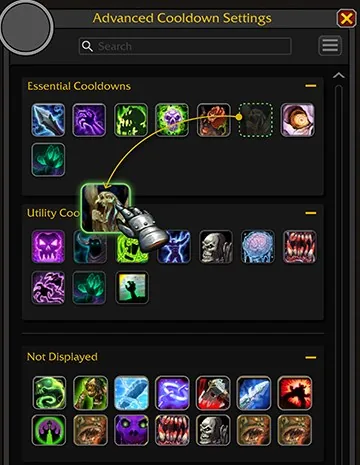
Blizzard has not announced what trigger or condition options Forever's Cooldown Manager has.
What the modern rules do restrict is logic that reads combat data to make decisions, so no addon, including a future WeakAuras release, can rebuild that kind of aura in Forever.
Threat without a threat meter
Threat still matters in Forever: Blizzard's Deep Dive recap says damage dealers still need to respect threat, focus targets carefully and use area damage only when it is safe.
As of September 28, 2026, Blizzard has not announced a built-in threat meter for Forever, and the modern damage meter's categories do not include threat.
Players have asked for one on Blizzard's Forever forums, and the request in our September 28 daily report had no Blizzard reply.
In the modern game, Blizzard's January 2026 notes added threat and aggro indicators to nameplates and an Aggro display option in the nameplate settings under Gameplay.
Blizzard has not said whether Forever's nameplate options include it; its beta notes updated September 24 only say the nameplate selection display was updated.
If your Forever client has a nameplate aggro option, turn it on; if not, fall back on what Blizzard itself asks of damage dealers.
① Respect threat: watch how much you generate.
② Choose your focus target carefully.
③ Use area damage only when it is safe.
④ When there are too many enemies for the tank to hold, use crowd control such as Polymorph, Banish, Fear or Root.
One more habit is our own general advice rather than a Blizzard statement: let the tank pull and build threat before you attack.
Blizzard has not said whether threat data counts as restricted combat information for addons in Forever.
Not announced yet, and a checklist before launch
As of September 28, 2026, Blizzard has not published a Forever list of Edit Mode elements, the Forever damage meter's details, when every class can use the Cooldown Manager, or a date for the swing timer.
In our daily report collected on September 28, 2026, an r/classicwow thread asking which Forever addons players use had 43 comments.
① Build an Edit Mode layout in the beta, and if your client offers Share, keep a text copy.
② If the damage meter appears in your beta client, turn it on and note which categories it shows.
③ If you play Druid, Mage, Priest, Warrior or Warlock, test the Cooldown Manager and tell Blizzard which spells you want tracked.
④ Before launch, check the release pages of WeakAuras, Details! and Bartender4 again and install only a file that lists Forever.
How to install addons is covered in our best addons guide and our addon status guide, so we do not repeat it here.