
Launched: when WoW Forever went live
WoW Forever is live, and Blizzard’s launch article now carries the title “Now Live”.
That article was published at 23:00 UTC on November 4, 2026.
All regions launched at once, per a post by Blizzard’s community manager earlier that day.
That moment was 3:00 p.m. PST on November 4, listed as 6:00 p.m. in Montreal (EST).
The same post lists 8:00 p.m. in Sao Paulo and 10:00 a.m. AEDT on November 5 in Sydney.
The German edition of the launch article still shows a regional table.
It gives UTC as 23:00 on November 4 and Korea as 8:00 a.m. KST on November 5.
It lists Europe under November 5 as “24:00 Uhr”; by our conversion that is 0:00 CET.
The countdown is over.
For a time in your own zone, use the converter on the launch times page.
What to do first, in order
Work through the steps below in order; the sections further down follow the same order.
If a step fails, skip to the section on what to try if you cannot get in.
Your first steps
- Check accessAn active subscription or Game Time.
- Pick the versionIn the Battle.net app, choose WoW: Forever under Game Version.
- Install and playPick the active account if you have several, then Install and Play.
- Choose a presetClassic or Enhanced, on your first login.
- Choose a rulesetAgree on ruleset and faction with your group first.
- Name your characterTwo names; the full name must be unique in your region.
Sources: Blizzard’s posts, checked on November 5, 2026.
We did not play the game for this checklist and report no launch-night experience of ours.
Access: subscription or Game Time
Access to WoW Forever comes with an active World of Warcraft subscription or Game Time.
| Check | What it means |
|---|---|
| Subscription or Game Time | Required to play |
| Upgrade (Heroic Pack or higher) | Optional, but needed for Skyborne |
| Invite-A-Friend code | Launch week only, November 4 to 11 (PST) |
Upgrade editions are optional and add cosmetics and other benefits (return guide).
The Skyborne race and its starting experience need the Skyborne Heroic Pack or higher.
The Epic Pack and Collection add 30 days of Game Time starting November 4.
Playing beyond those 30 days needs a subscription or additional Game Time.
Invited friends can play without either during launch week, November 4 to 11 (PST).
A launch-night bug restricted some players who joined with an Invite-A-Friend code.
It blocked certain chat channels, leveling past 10, guilds, parties and trading.
If you were affected, log out and back in; Blizzard says a hotfix is live.
The Warcraft Forever Collection stays on sale through January 11, 2027.
Install: pick WoW: Forever in the Battle.net app
Update your operating system and graphics drivers first, as the return guide suggests.
Sign in to the Battle.net desktop app for Windows or Mac.
Select WoW: Forever from the menu, then again under the Game Version menu.
With more than one WoW account, a second dropdown appears.
Pick the active account you want to play on from that column.
Pick the right license: a pack can sit on just one of them, as Customer Support noted.
Select Install; the progress bar shows when the game can be played.
When the install finishes, select Play.
First login: choose an Experience Preset
Your first login asks you to Choose Your Experience Preset, before the ruleset.
The two presets are Classic and Enhanced.
Classic is the simpler look, with fewer modern features on by default and less guidance.
Enhanced has higher visual fidelity and more interface features on by default.
| Starting setting | Classic | Enhanced |
|---|---|---|
| Character models | Standard Definition | High Definition |
| Quest points of interest and objective markers | Off | On |
| One-bag | Off | On |
| Transmog | Off | On |
| Default keyboard movement | Camera turning | Strafe |
| Screen UI layout | Classic | Centralized |
Experience Preset starting settings from Blizzard’s launch article, checked 2026-11-05.
Not sure? Start with Enhanced, as Blizzard suggests.
The preset does not lock anything; change single settings later under Game Menu, Options.
The preset screen does not appear again after your first login.
Each new character can still use High Definition (HD) or Standard Definition (SD) models.
That choice affects appearance only; change it later in Options or at a Barbershop.
Choose a ruleset: four now, Hardcore later
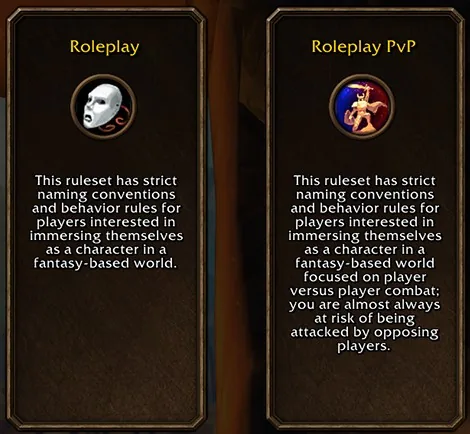
You pick a ruleset rather than a traditional realm.
The four in the launch article are Normal, PvP, Roleplay and Roleplay-PvP.
Hardcore will become available sometime after launch; details and timing come later.
| Ruleset | Focus | Factions |
|---|---|---|
| Normal | Adventuring; PvP at your discretion | Both |
| PvP | Almost always at risk from opposing players | One per account |
| Roleplay | Strict naming and behavior rules | Both |
| Roleplay-PvP | Roleplay rules plus open-world PvP risk | Not stated |
| HardcoreSometime after launch | Death carries lasting consequences | Both |
Blizzard’s launch article and ruleset post, checked 2026-11-05.
Agree on ruleset and faction with friends and guild first, as the return guide advises.
Characters on different rulesets cannot group for dungeons or raids.
Horde and Alliance cannot group either.
Moving between rulesets is intentionally limited; you create a new character instead.
On the PvP ruleset, one account can only create characters for one faction.
Normal and Roleplay allow both factions.
For Roleplay-PvP, the ruleset post states no such rule as of November 5, 2026.
Name your character: two parts
Every character has two names, and together they form a full name.
Only the full name must be unique within your region.
Two characters can share a first name if their full names differ.
Splitting a restricted word may not help; Blizzard can evaluate both parts together.
If a name is taken or rejected, try another combination or the random name generator.
Early Name Reservation is over; it ended November 4, 10 a.m. Pacific (Blizzard Support).
Its limit of three characters applied only to reservation, Blizzard said.
Cap now: 70 Forever characters per WoW account, across all rulesets (Blizzard Support).
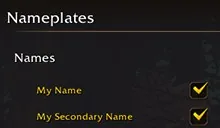
To show only your first name in the world, open Options, then Nameplates.
Then clear “My Secondary Name”; the second name still appears in chat.
What is in the game now, and what comes later
| Content | Size | When |
|---|---|---|
| New quests, levels 1–60 | More than 1,000 | Now |
| Riverglades quests | More than 150 | Now |
| New five-player dungeons, levels 13–60 | Nine | Now |
| Barrow Deeps, Hyjal Summit, Onyxia’s Lair | Three raids | December 9 |
| Hardcore ruleset | One ruleset | Sometime after launch |
Blizzard’s launch article, U.S. English edition, checked 2026-11-05.
The level 1–60 journey has more than 1,000 new quests (launch article).
New zones include Mount Hyjal, Shen’dralas, the Riverglades and Zephras Isle.
The Riverglades adds more than 150 new quests across much of the mid-30s to mid-40s.
Zephras Isle is the Skyborne starting zone, for levels 1 through 12.
Nine new five-player dungeons cover levels 13 through 60.
On December 9, three raids open to level 60 players.
They are Barrow Deeps, Hyjal Summit and Onyxia’s Lair.
The Korean edition of the article gives that date as December 10.
The article gives no unlock time, so we list dates only.
If you cannot get in
Faction closed: on PvP you cannot hold both factions at the same time.
A significantly dominant faction is also temporarily restricted (Blizzard Support).
Our rulesets guide explains how that works and what Customer Support has advised.
Game will not run: check the system requirements guide and your graphics drivers.
Make sure your addons are up to date too, as Blizzard’s launch info post advises.
It links a guide to resetting your user interface and a technical troubleshooting page.
Cannot sign in: start with “Can’t Log In?” on Blizzard’s account recovery page.
If self-service fails, the Blizzard Support portal lets you contact a Game Master.
Access license message: in a similar U.S. thread, Customer Support checked two things.
It asked whether the right WoW license was selected, and pointed one player to the region.
Those were replies to individuals, October 28 to November 3, not a general fix.
Our daily data, collected on November 5 just before launch, shows this draws attention.
Two U.S. forum threads asking about faction locks had 49 and 48 comments.
A thread about a license message at login had 23 comments.
Those are player reports from before launch, so we do not treat them as facts.
We have no launch-night forum data in that collection.
Boats and zeppelins can get lost for a while, a developer wrote late on November 4.
As a stopgap, portals were added near most docks and inside the zeppelin towers.
A proper fix was due in the morning, and then the portals would go, the developer said.
Some areas feel less populated than they should; tuning will follow, another reply said.
These were U.S. forum replies, and they may be out of date when you read this.
Blizzard’s support article and forum posts are in the sources at the end of this page.
Not announced yet
Three details are still missing as of November 5, 2026.
The Hardcore date: Blizzard says details and timing come later.
Whether Roleplay-PvP limits you to one faction: the posts do not say.
Also open: how far a faction must lead before character creation closes.
We will add them once Blizzard publishes them.
Every change is listed in the change log and on the site updates page.